
Milling is a very important machining method in CNC machining, and tool setting is a critical and indispensable step that must be performed before machining parts on a CNC machine tool.
The purpose of tool setting is to establish a precise positional relationship between the tool and the workpiece.
Specifically, this involves determining the mechanical coordinate values of the tool tip relative to the workpiece origin, storing these values in the machine’s memory, and calling them up within the CNC program.
This allows the CNC system to accurately control the tool as it cuts along the programmed path.
CNC milling operations commonly require multiple workpiece clamping steps and the use of multiple cutting tools.
In such cases, the ease and accuracy of the tool setting process directly impact the workpiece’s positional accuracy, dimensional accuracy, and production efficiency.
Engineers develop a set of precision tool setting methods based on years of machining experience to enable high-precision and high-efficiency tool setting.
This method has significantly improved the first-pass yield rate for complex parts.
XY-Axis Centering and Tool Setting
Centering and tool setting eliminates the shortcoming of single-point tool setting, which cannot compensate for tool geometric errors, thereby ensuring high machining accuracy.
It is a standardized, widely accepted, and adopted operational procedure in CNC machining.
This method offers advantages such as ease of operator training, handover, and quality control. Workpieces requiring multi-operation machining necessitate repeated flipping, clamping, and tool setting.
To ensure higher positional accuracy in CNC machining and achieve high-precision coordinate system transfer between processes, engineers design a lever-type dial indicator tool setting device, as shown in Figure 1.
This device utilizes a lever-type dial indicator to perform high-precision XY-axis tool setting on the workpiece using the centering method.
X-Axis Tool Setting Procedure
Figure 2 illustrates a schematic of the tool setting device used for X-axis tool setting on the workpiece. The tool setting procedure is as follows:
1) Mount the tool setting device on the spindle, move the X-axis, and position the dial indicator head to contact the left side of the workpiece.
2) Rotate the spindle left and right to locate the point on the left side where the dial indicator registers the highest deflection.
3) Move the X-axis to the left to press the dial head 0.1 mm into the workpiece surface.
At this point, the dial gauge needle rotates 10 divisions; record the dial gauge reading and the current X-axis mechanical coordinate value X1.
4) Using the same method, locate the point on the right side of the workpiece where the dial indicator registers the highest reading.
Move the X-axis to the right and observe the dial indicator needle. Stop the X-axis when the current reading matches the reading obtained on the left side.
Record the current X-axis coordinate value X2.
5) Calculate the coordinate value of (X1 + X2) / 2 and store it in the X-axis value list of the workpiece coordinate system G54.
This completes the X-axis tool setting for the workpiece.
6) Perform Y-axis tool setting on the workpiece using the same method.
Benefits of Dial Indicator Tool Setting
With dial indicator tool setting, the indicator needle makes direct contact with the measured surface during measurement, eliminating sources of error such as mechanical backlash and elastic deformation caused by the “radial runout contact” principle of centering pins.
The dial indicator displays readings objectively on the dial, which reduces reliance on the operator’s tactile sensation compared with centering pins.
A dial indicator provides the best choice for achieving high-precision tool setting.
Z-Axis Multi-Tool Tool Setting
Z-Axis Reference Tool Tool Setting
For workpieces machined in multiple operations, the Z-axis tool setting surface is typically a machined surface.
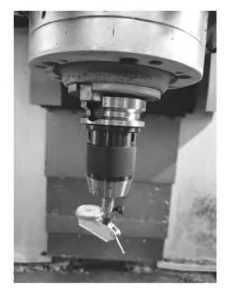
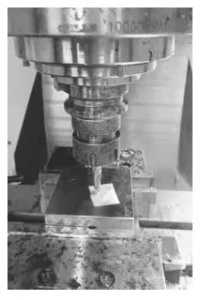
Operators commonly use the paper-sheet method for tool setting in such cases to ensure the workpiece meets depth and positional accuracy requirements. Figure 3 illustrates the paper-sheet method.
Paper-Sheet Tool Setting Procedure
The specific procedure is as follows:
1) Moisten a sheet of paper with coolant or oil and attach it to the upper surface of the workpiece.
2) Select a tool as the reference tool, and use it as the length reference standard.
Measure and set the length compensation values of all other tools relative to this reference tool.
3) Mount the reference tool on the spindle. Rotate the spindle at low speed until it contacts the paper strip.
When the paper strip is shredded and scattered by the tool, stop the spindle feed.
Subtract the thickness of the paper strip from the current position; this value represents the workpiece Z-axis tool setting value.
4) Calculate the Z-axis coordinate value and store it in the Z-axis value list of the workpiece coordinate system G54. The workpiece Z-axis tool setting is now complete.
Advantages and Accuracy Considerations of the Paper-Sheet Method
Operators use standard copy paper in the paper-sheet method, but it compresses easily and provides poor thickness stability.
Higher tool setting accuracy requires materials with more uniform thickness and better compression resistance, such as micrometer shim paper.
Additionally, the accuracy of the paper-sheet method depends largely on the operator’s experience and tactile sensitivity.
To master this method and achieve high-precision tool setting, continuous practice during work is essential—practice makes perfect.
With some time and experience, anyone can effectively master this method.
The paper-sheet method offers significant advantages, including extreme simplicity, low cost, and ease of operation, making it worthy of promotion.
Measuring the Length of Multi-Tool Cutters
A Z-axis tool setter measures the length of cutters used in machining.
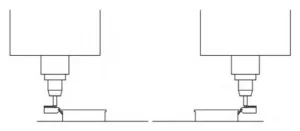
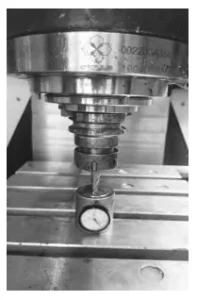
Figure 4 illustrates the process of measuring cutter length with a Z-axis tool setter.
The specific steps are as follows:
1) Place the Z-axis tool setter on the machine tool table.
2) Mount the reference tool onto the machine tool spindle.
Lower the spindle so that the tool tip presses 0.1 mm into the upper surface of the Z-axis tool presetter, and the presetter dial returns to zero; set the Z-axis coordinate value in the machine’s relative coordinate system to 0.
3) Number the remaining tools and mount them sequentially onto the machine tool spindle.
Lower the spindle so that the tool tip presses 0.1 mm into the upper surface of the Z-axis tool setter; at this point, the tool setter’s dial should read zero.
4) The system records the current Z-axis relative coordinate value, which represents the length difference between the current tool and the reference tool.
It then stores this value in the length compensation list (H values) corresponding to the tool number.
Each tool now completes its tool setting process. A dial indicator measures tool length in this method, achieving high efficiency while significantly reducing measurement errors and enabling high-precision tool setting.
Note:
To avoid damage or wear of the standard tool during machining and to reduce setup time, operators limit the standard tool to Z-axis tool setting and tool length measurement.
Actual machining operations exclude the use of the standard tool to maintain consistency and prevent unnecessary tool degradation.
CNC Program
A CNC program prevents tool collisions caused by insufficient tool length compensation.
This section explains the precautions associated with the program to ensure safe machining operations.
Table 1 presents the programming for tool length compensation and outlines the precautions required when using the reference tool for tool setting.
表1
Conclusion
Tool setting on CNC milling machines is critical to the machining quality of parts.
Multi-tool and multi-process workpieces adopt a centering method with a lever dial indicator to achieve precise tool setting on the X and Y axes of the workpiece.
A reference tool is used together with the paper-sheet method to establish accurate Z-axis tool setting, while a Z-axis tool setter measures each tool length with high precision.
A dedicated CNC program for tool length compensation supports the process and ensures safe machining operations.
This method is both convenient and easy to implement while meeting high-precision tool setting requirements.
Practical machining applications demonstrate that this method controls positioning repeatability within ±0.005 mm during multi-process operations.
The improved positioning consistency also significantly increases the qualification rate of complex parts.
Mastering this highly practical method requires continuous practice and repeated operation.
Operators can improve tool setting efficiency and accuracy by gradually developing proficiency in operational techniques and tool setting skills through hands-on experience.